
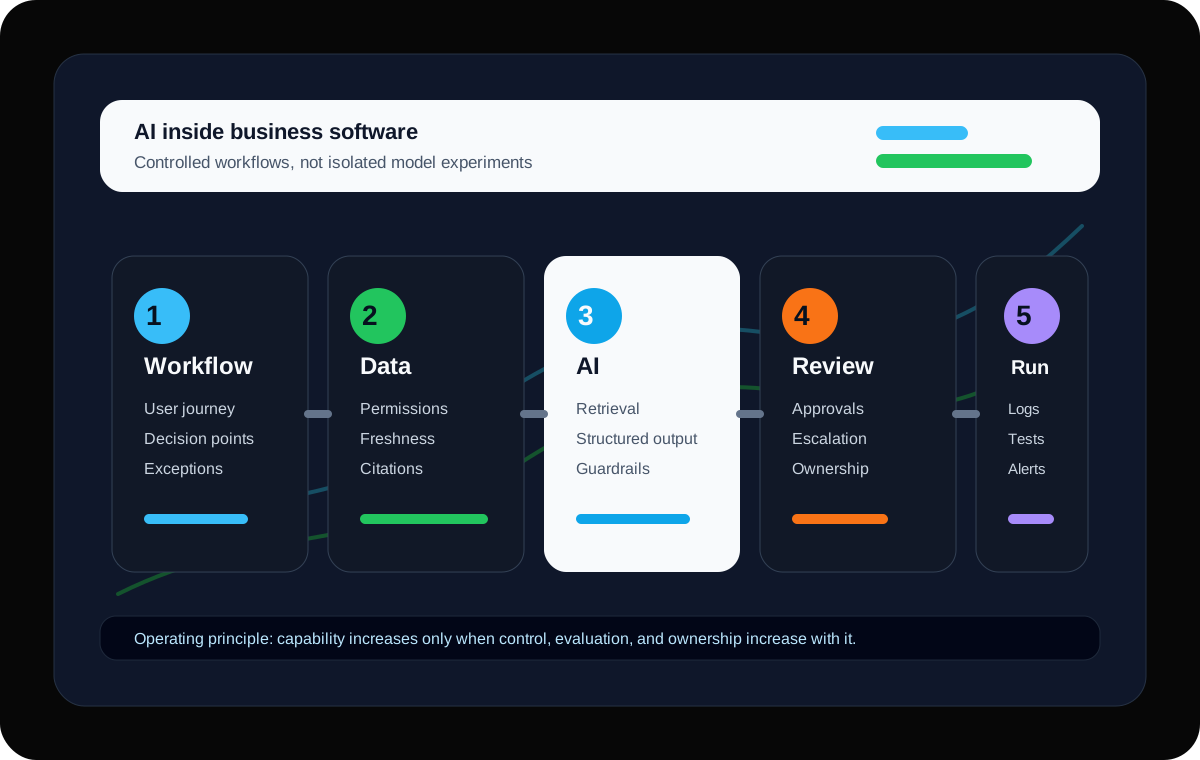
Most companies do not fail at AI because the model cannot produce an impressive answer. They fail because the answer is disconnected from the workflow, the data boundary is unclear, nobody knows who must review it, and the team has no reliable way to measure whether it is improving or quietly creating risk.
That is why AI inside business software should be treated as a product and engineering problem, not a novelty layer. The work is not only prompt writing. It is workflow design, data design, user experience, access control, evaluation, monitoring, and support.
This is especially true for financial-services, operations, compliance, sales, support, and internal platform environments where software carries real business responsibility. A clever demo can be useful for learning, but a production AI workflow has to survive edge cases, user trust, audit questions, release cycles, and day-two ownership.
The goal is not to make AI feel magical. The goal is to make the business more capable while keeping responsibility visible.
01 · AI does not enter a business in isolation
The real risk is uncontrolled workflow change
A business workflow already has people, systems, decisions, approvals, exceptions, and informal checks. When AI is inserted into that workflow, it changes how information is produced and how confidence is formed. That change is valuable, but it has to be designed.
The weak version of AI delivery asks, 'What can we automate?' The stronger version asks, 'Where can AI improve the quality, speed, consistency, or confidence of this workflow without removing the controls that keep the business safe?'
For a company using AI in important software, control is not bureaucracy. Control is the difference between a tool people can trust and a tool people quietly work around.
02 · The model is a component, not the strategy
Start with the job, not the model
AI is most useful when it improves a specific job someone already has to do. That job might be reading dense documents, finding the right policy, preparing a response, comparing records, summarising a case, classifying an inbound request, or spotting an exception before it becomes expensive.
Start by mapping the existing workflow in plain language. Who starts the work? What information do they need? Which systems do they touch? Where does judgement happen? What causes delays? What creates rework? What should never happen without review?
Once that is clear, AI opportunities become easier to rank. The best first use cases usually have repeated information work, bounded source material, visible user value, and a clear owner.
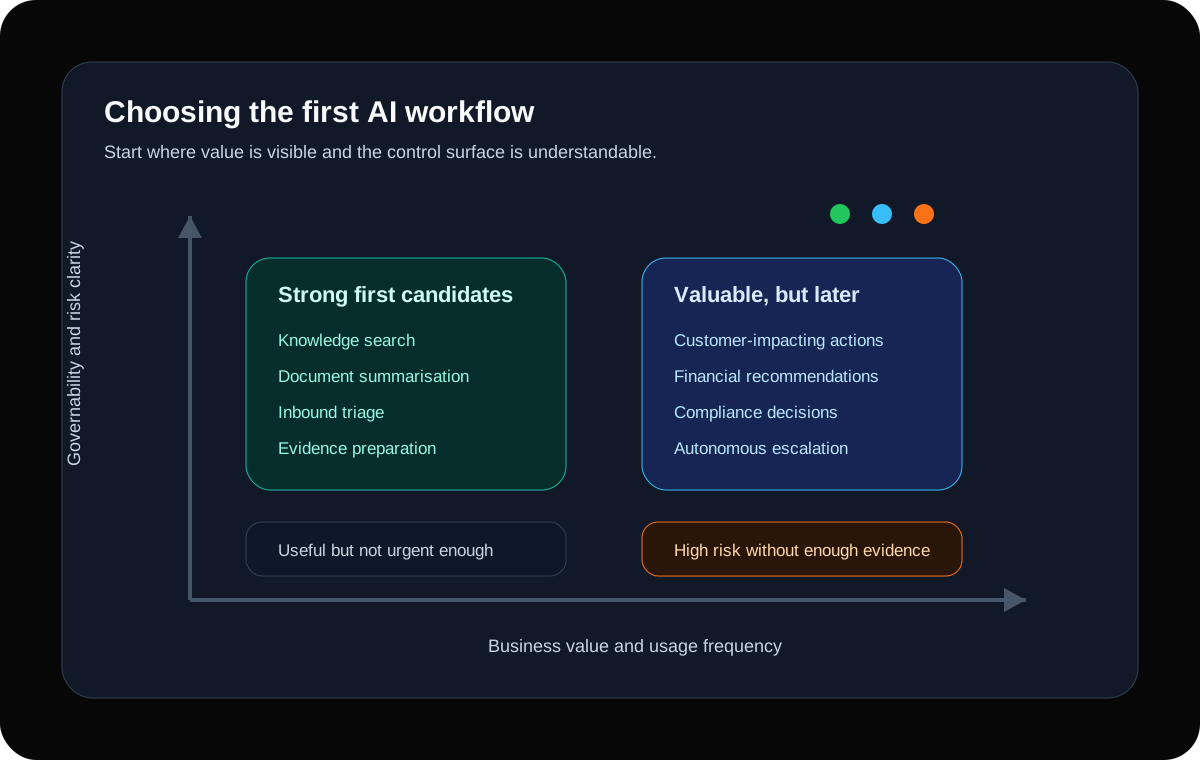
- Good first fit: high-volume document reading, summarisation, routing, search, drafting, extraction, evidence preparation, and internal knowledge retrieval.
- Handle carefully: customer-impacting recommendations, financial calculations, compliance decisions, or anything that could materially affect a person without review.
- Avoid at first: broad autonomous agents with unclear data access, unclear responsibility, and no measurable operating workflow.
03 · Not every valuable AI feature should act on its own
Choose the right automation level
One of the most useful design decisions is deciding how far the AI is allowed to go. Many workflows become dramatically better with AI assistance without needing autonomous action. In higher-risk environments, that distinction matters.
A practical way to think about this is an automation ladder. Each level can be useful, but each level also carries more responsibility. Teams should only move up the ladder when the workflow has enough evidence, monitoring, and trust.
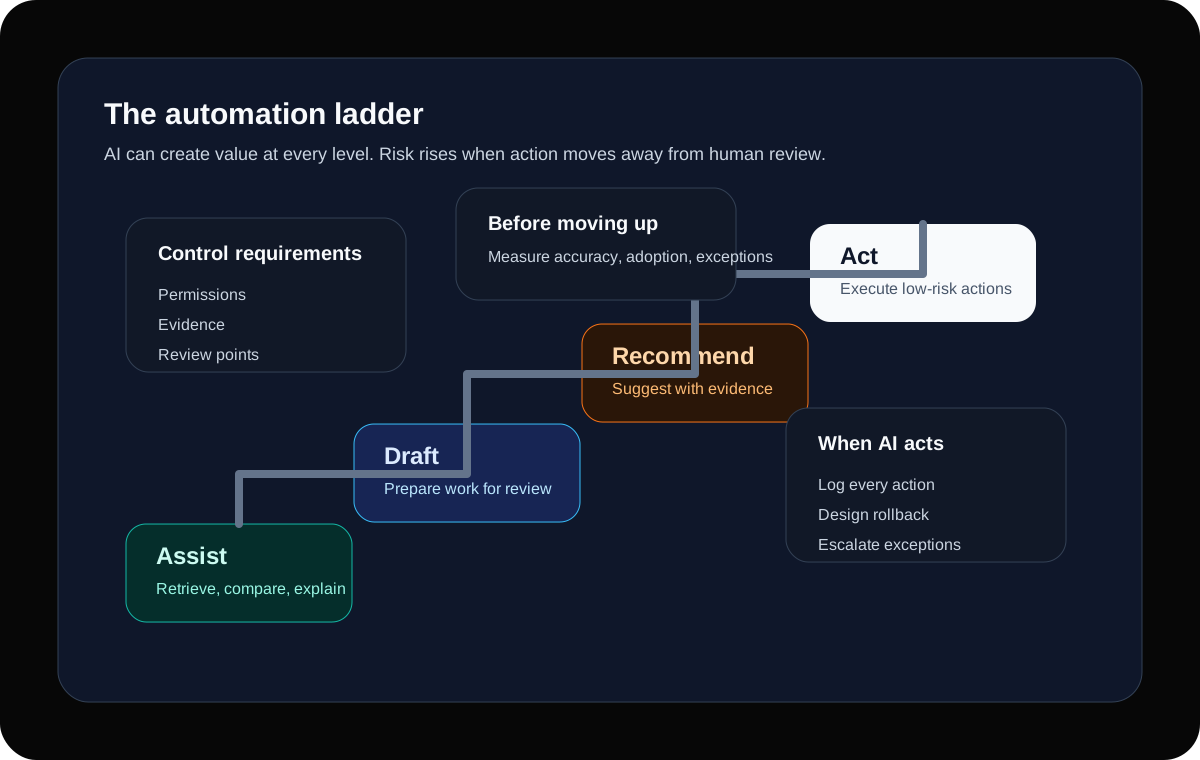
01
Assist
The system retrieves, summarises, compares, or explains information while the user stays fully in control.
02
Draft
The system prepares text, classifications, notes, or next-step suggestions for a person to review and edit.
03
Recommend
The system proposes a decision or action with evidence, confidence, and a clear review path.
04
Act
The system takes a low-risk action automatically, with logging, rollback options, monitoring, and escalation rules.
04 · The architecture should make responsibility visible
Build a control architecture
A production AI workflow needs more than an interface and a model key. It needs a structure that defines what data can be used, how context is retrieved, what the model is allowed to produce, how users review the output, what gets logged, and what happens when the system is uncertain.
For retrieval-based AI, source quality is part of the product. If the system searches policies, customer records, operational documents, or knowledge bases, it needs clear rules for indexing, permissions, freshness, citations, and source conflict.
For workflow automation, action boundaries are part of the product. The system should know which actions require approval, which actions can be queued, which actions can be reversed, and which actions must be blocked.
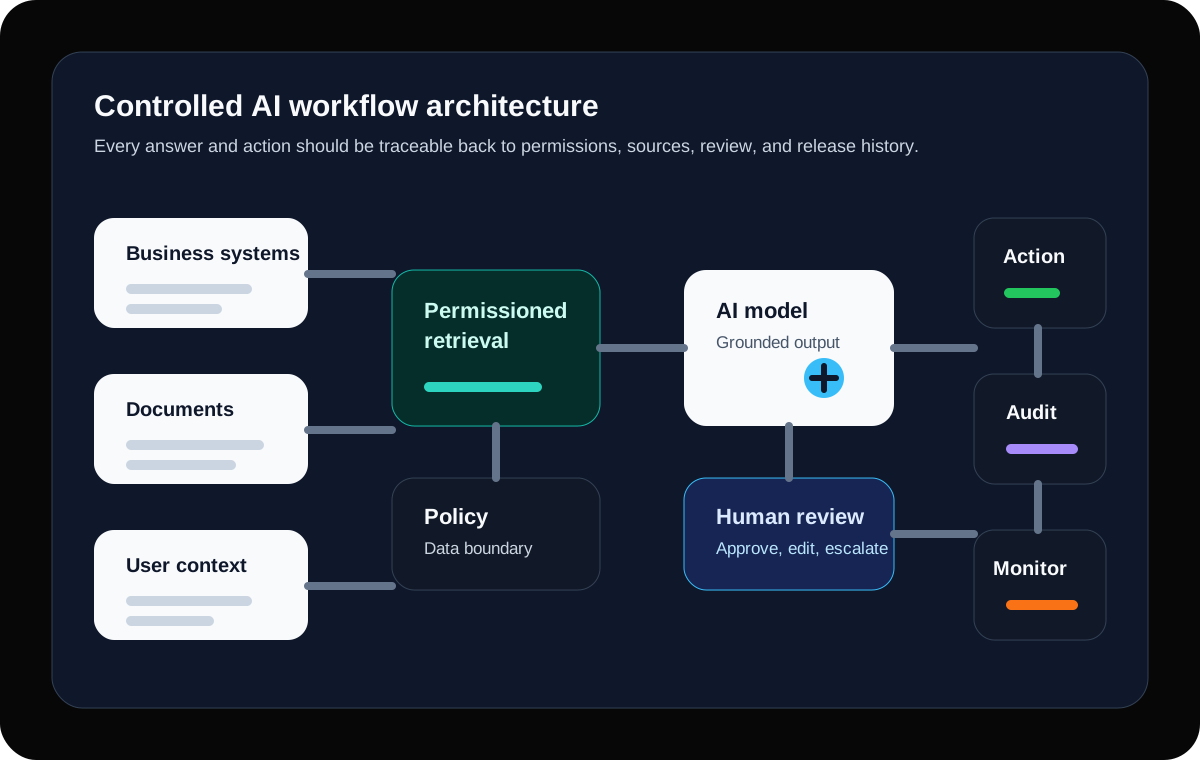
- Data boundary: which sources the AI can access, under which permissions, and for which users.
- Context layer: retrieval, ranking, citations, freshness checks, and source traceability.
- Model layer: prompts, tools, guardrails, structured outputs, and fallback behaviour.
- Workflow layer: review screens, approvals, status changes, notifications, and exception handling.
- Audit layer: user actions, source references, prompt versions, output versions, and release history.
- Operating layer: monitoring, feedback, evaluation sets, incident response, and improvement ownership.
05 · AI becomes credible when it solves familiar problems
Use implementation patterns that already fit business work
The strongest early AI projects usually do not ask the business to invent an entirely new operating model. They improve work the business already understands. That makes adoption easier, measurement clearer, and risk easier to explain.
A practical AI roadmap can be built from repeatable patterns. Each pattern still needs local discovery, but the shape of the control problem is known enough to design responsibly.
- Document intelligence: extract, summarise, compare, and cite information from contracts, policies, statements, applications, or operational documents.
- Internal knowledge retrieval: help staff find trusted answers from approved knowledge bases, process notes, technical documentation, or product rules.
- Case and request triage: classify inbound work, identify missing information, suggest routing, and prepare the next action for review.
- Compliance and evidence preparation: assemble source references, checklists, review notes, and exception summaries for accountable people.
- Operational decision support: surface relevant context, anomalies, previous actions, and recommended next steps inside an existing workflow.
- Production support assistance: summarise incidents, search runbooks, prepare release notes, and help teams understand system behaviour faster.
06 · Prompt quality cannot compensate for unclear data rules
Protect data before improving prompts
Many teams begin AI work by iterating prompts. Prompt quality matters, but data quality and data permission matter earlier. If the AI can see the wrong information, cannot see the right information, or cannot explain where its answer came from, the workflow will lose trust.
The data design should clarify source ownership, sensitivity, retention, user permissions, and whether outputs can be stored, reused, or used for future evaluation. This is not only a security concern. It is a product trust concern.
In real business software, the user experience should make evidence visible. A summarised answer is stronger when users can see the source, understand the confidence, and correct the system when it misses context.
- Define which systems, documents, records, and fields the AI may access.
- Respect existing user permissions instead of creating a privileged AI shortcut.
- Separate confidential, regulated, customer, operational, and public data sources.
- Decide what outputs are stored, for how long, and who can inspect them.
- Show citations or source references when the user needs evidence.
- Create a correction path so bad context can improve the system over time.
07 · Review is not a failure of automation
Design human review as a feature
A good AI workflow does not hide the human. It places human judgement at the right point in the process. That might mean reviewing a draft, approving a classification, checking extracted values, confirming a recommendation, or handling exceptions that fall outside the system's confidence.
The review experience should be fast and focused. Users should not have to reconstruct the entire workflow to decide whether the AI output is usable. They should see the source, the proposed output, the reason for review, and the available actions.
When review is designed well, the system becomes safer and more useful at the same time. Human corrections become feedback. Exceptions become learning opportunities. The team gains evidence about which parts of the workflow can be trusted further.
08 · A reliable AI feature needs a scoreboard
Evaluate production behaviour, not demo quality
A demo asks whether the system can produce a plausible answer. Production asks whether it behaves well across the common cases, awkward cases, missing-data cases, adversarial cases, and boring daily cases that make up real work.
The evaluation approach should be tied to the workflow. A document extraction tool should be measured differently from a support triage assistant or a policy retrieval assistant. The point is not to invent abstract AI metrics. The point is to know whether the workflow is getting better.
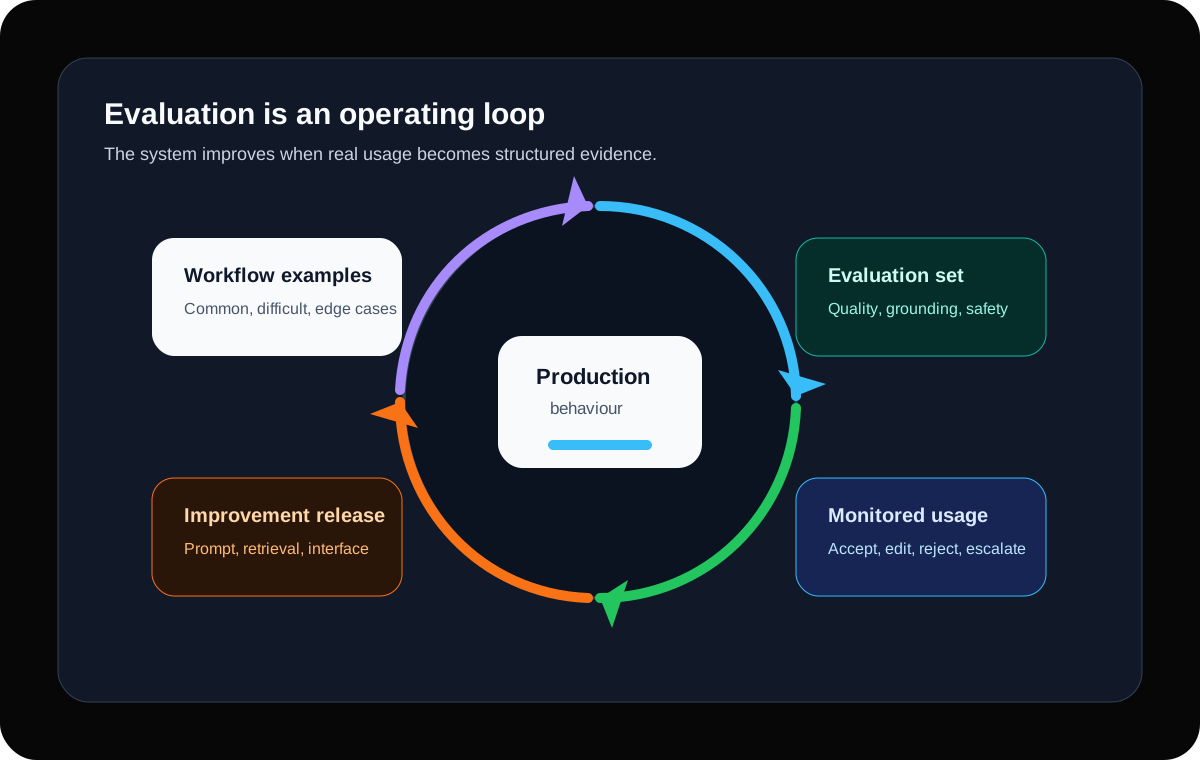
- Retrieval quality: did the system find the right source material?
- Answer quality: was the answer accurate, complete, and grounded in available evidence?
- Action quality: did the suggested next step match the workflow rule?
- Review quality: how often did users accept, edit, reject, or escalate the output?
- Business quality: did the workflow reduce delay, rework, missed information, or support load?
- Reliability quality: did failures get logged, surfaced, and improved instead of disappearing into user frustration?
09 · Most AI risk is created by vague ownership
Avoid the failure modes that make AI lose trust
AI systems often lose trust quietly. Users do not always complain in a dramatic way. They stop relying on the output, double-check everything manually, or create a side process because the official workflow feels unsafe.
The warning signs usually appear before the technology fails completely. They show up as unclear data sources, unexplained answers, inconsistent review behaviour, low adoption, and nobody being sure who owns improvements.
- The system gives answers without showing source material when the user needs evidence.
- The AI can access more data than the user should be able to see.
- Users can accept outputs, but the system does not log what changed or why.
- The team measures model activity, but not workflow improvement.
- Nobody reviews rejected outputs to learn why they failed.
- The prototype has a champion, but the production workflow has no owner.
- The model, prompt, or retrieval setup changes without release notes or regression checks.
- The fallback path is manual panic instead of a designed exception flow.
10 · Trust is built through controlled exposure
Launch in phases
The safest way to ship AI into business software is usually not a dramatic launch. It is a phased rollout that starts with a controlled group, known workflows, clear success measures, and a feedback loop that can influence the next release.
The first release should prove the workflow and operating model. Once behaviour is understood, the system can expand to more users, more data, more automation, or more connected actions.
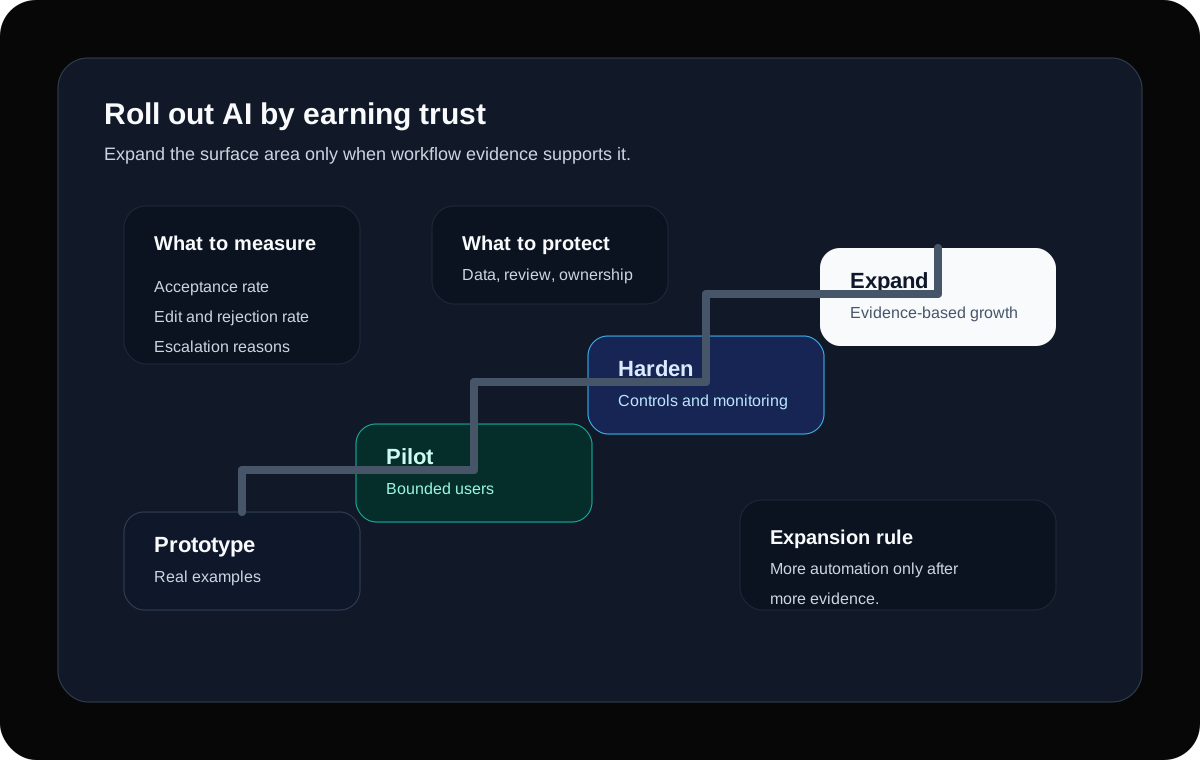
01
Prototype the workflow
Use real examples, source material, user screens, and review paths. Prove the shape of the work before hardening the system.
02
Pilot with boundaries
Limit the user group, data scope, and automation level while measuring quality and gathering feedback.
03
Harden for production
Add monitoring, permissions, release controls, evaluation sets, fallbacks, and operational ownership.
04
Expand with evidence
Increase coverage only where acceptance, quality, review behaviour, and business outcomes justify it.
11 · The early output should reduce uncertainty
What a serious first 30 days should produce
A strong AI engagement does not need to spend months in theory before anything becomes visible. It should create useful artefacts quickly: workflow maps, risk decisions, prototype screens, data boundaries, evaluation examples, and a delivery plan that sponsors and engineers can both understand.
By the end of the first month, the team should know whether the workflow is worth building, what it will take to build safely, and what the first controlled release should include.
- A ranked list of AI workflow opportunities with business value and risk.
- A selected first workflow with user journey, data sources, review points, and action boundaries.
- A working prototype or clickable flow using real examples where possible.
- A data and permission model for the first release.
- An evaluation set that reflects common, difficult, and edge-case scenarios.
- A production plan covering monitoring, feedback, support, releases, and ownership.
12 · AI work belongs inside serious software delivery
What Software Couch builds
Software Couch helps companies add AI to business software in a way that is useful, controlled, and maintainable. That can mean building a new AI-enabled workflow, adding retrieval to an existing platform, modernising an internal process, or giving a team senior engineering capacity around an AI initiative.
The emphasis is practical: understand the workflow, design the controls, build the software, integrate with the existing environment, and support the system after launch.
- AI-enabled workflow tools for document-heavy, knowledge-heavy, and operational processes.
- Retrieval and internal knowledge systems with permissions, citations, and review paths.
- Custom software that embeds AI into real business screens instead of isolated chat experiments.
- Senior engineering capacity for teams that need architecture, implementation, integration, and production ownership.
- Cloud, DevOps, monitoring, and support foundations for AI systems that need to keep improving after launch.